
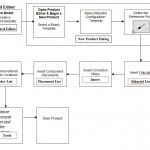
| 1. Create a PCB board template.
2. Create a product. Select a board template. 3. Assign a machine configuration to a product. 4. Define the reference point of a product. 5. Insert fiducials in the fiducial list. 6. Insert correction steps. 7. Add components to the placement list. 8. Optimize feeders and placement sequence via the throughput optimization aid. 9. Simulate the product using the performance simulator. 10. Export the product to run on the Platform machine or split the product with Line Balancer. |

Write a Comment